Audiobook Binder Pro Audiobook Players
Audiobook Players
As an M4B converter for Mac, Audiobook Binder Pro creates M4B audiobooks so long audio can behave more like a book: chapters, cover art, metadata, and remembered playback position in players that support those features.
The M4B file itself is the same wherever it goes; what changes is how each app reads it. A dedicated audiobook player shows your chapter list, keeps the cover art, remembers exactly where you stopped, and adds audiobook-friendly controls like a sleep timer and speed adjustment. A plain media player might do nothing more than push the audio out of the speakers. That difference is why the same file can feel like a polished audiobook in one app and a single unbroken track in another.
The best player depends on how you listen. Here is where to start, and which apps tend to handle M4B well on Mac, iPhone, iPad, and Android.
Apple Books
Apple Books is the simplest place to start on Apple devices. Audiobook Binder Pro is built around this workflow: create the audiobook on your Mac, then listen in Apple Books on Mac, iPhone, or iPad. Double-click an M4B file to add it to your library, and Apple Books can sync your position across your devices through iCloud. The Apple Books import guide shows where the audiobook appears and what to check if it does not show up.
In practice you can bind a 22-hour novel from a folder of MP3 files on your Mac in the morning, and by the time you are on the bus that evening the same audiobook is waiting in Apple Books on your iPhone, open to the exact minute you last heard. The book lands under the Audiobooks tab rather than mixed in with ebooks, and tapping the chapter icon brings up the list of chapters you defined at binding time, so you can jump straight to “Chapter 12” or back to the prologue without scrubbing the timeline.
v2 also includes an option to add finished single-file audiobooks to Apple Books automatically after export. With it on, a book bound as one file skips the manual drag-and-drop step and shows up in your library once the export finishes. Books split into multiple files are not added automatically, so you would drag those in yourself.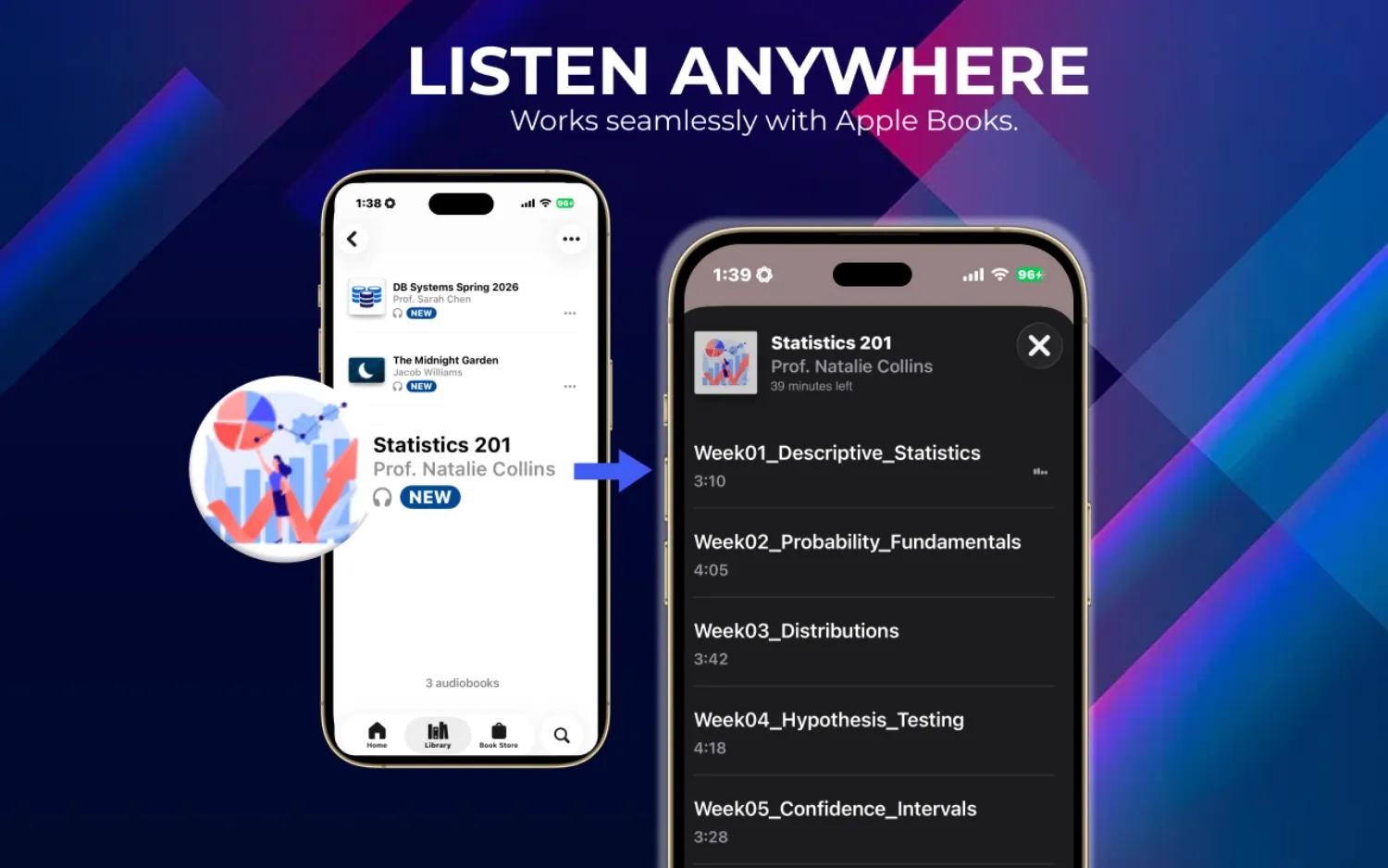
Self-hosted audiobook libraries
Some listeners keep their audiobooks in self-hosted libraries or media servers. M4B is usually the format people reach for here because it keeps long audio together with chapters and metadata in one file. A single tidy file is far easier to catalog than a folder of forty loose MP3s, and it travels between the server and its companion apps without losing its chapter list or cover. This appeals to people rebuilding a personal collection from ripped discs, family recordings, or public-domain readings, and to households where several people listen from the same library on different devices. Chapter and position support can differ between servers and apps, so it is worth checking how your chosen setup handles M4B before you rely on it.
Plex
A media server that organizes movies, music, and audiobooks in one place. M4B files with embedded chapters generally display in the Plex audiobook library, and Plex can stream to phones, tablets, browsers, and smart TVs on your network. It expects a Plex Media Server running on your computer or NAS.
Prologue
An iPhone audiobook player built specifically for Plex libraries, with a sleep timer, variable playback speed, and CarPlay support. If you already run Plex, it is a natural companion app for listening on the go.
Audiobookshelf
An open-source audiobook and podcast server with M4B chapter recognition, progress tracking, and multi-user accounts. It runs on a home server, a Raspberry Pi, or a Docker container, which suits people who want full control of their library without a third-party service. Companion apps are available for the web, iOS, and Android.
Dedicated mobile audiobook players
Some people prefer dedicated audiobook apps instead of a library server. These are useful when you want local files, sleep timers, skip controls, or chapter navigation without managing a full server. Look for an app that supports M4B chapter navigation and remembered position, and confirm how it imports local files.
BookPlayer
A lightweight, free audiobook player for iPhone and iPad. It can import M4B files directly from the Files app or via AirDrop, with chapter navigation, a sleep timer, and adjustable speed, and no server required. For a dedicated iPhone player without server overhead, it is an easy first pick.
Smart AudioBook Player
A widely used audiobook app on Android that can handle M4B files with chapter support. It offers speed control, a configurable sleep timer, and automatic bookmarking when you pause or close the app, aimed at listeners who do not want to run a media server.
Bookmobile
An iOS audiobook player with a drive mode, customizable skip intervals, and large, easy-to-tap controls, plus M4B import with chapter recognition. Handy if you mostly listen during long drives.
General media players
General media players can play the audio stream inside an M4B, but they may not give the full audiobook experience.
VLC
VLC plays virtually any audio or video format across macOS, iOS, Android, Windows, and Linux, which makes it a reliable fallback. It does not reliably show audiobook chapter markers or remember your position, though, so for regular audiobook listening a dedicated audiobook app is a better fit.
Getting a finished M4B onto each player
Binding the audiobook is only half the job; the file still has to reach the device you actually listen on. The route depends on the player.
For Apple Books, the finished M4B stays on the Mac and syncs outward through iCloud, or you drop it in on the Mac and it appears on your other Apple devices. For an iPhone or iPad app like BookPlayer or Bookmobile, the usual paths are AirDrop straight from the Mac, saving the file into iCloud Drive or the Files app and opening it there, or importing from a cloud folder like Dropbox. For an Android app such as Smart AudioBook Player, connect the phone over USB and copy the M4B into the app’s audiobook folder, or drop it into cloud storage and download it on the device. For a server such as Plex or Audiobookshelf, you place the M4B in the library folder the server watches, and every companion app streams it from there without a separate transfer. Spoken-word audio stays small, so even a full-length novel usually lands in the low hundreds of megabytes, which keeps these transfers quick.
A quick tip: check the chapters before you commit
Before you assume a player handles your book the way you want, test one file first. Bind a single audiobook, open it in your chosen app, and confirm three things: the chapter list appears and jumps to the right places, the cover art shows up, and the app returns to where you left off after you close and reopen it. Players such as VLC will often play the audio fine while quietly ignoring the chapters, so a two-minute check saves you from discovering the gap halfway through a long listen. Once you have confirmed a player behaves, the rest of your library will behave the same way, since every book you bind uses the same M4B structure.
Which player should you use?
If you are on Apple devices and want the simplest setup, use Apple Books: double-click an M4B on your Mac and it appears in your library, ready to continue on iPhone and iPad.
If you run a media server at home, pairing Plex with Prologue on iPhone is a strong combination, and Audiobookshelf is a good fully open-source alternative. Both are built to handle M4B chapters and track progress across sessions.
For a dedicated iPhone player without server overhead, BookPlayer is a great free pick. On Android, Smart AudioBook Player is the one most listeners reach for. Keep VLC in mind only as a fallback, since it will not reliably remember your position or show chapters.
When M4A is better
If you do not need audiobook behavior, Audiobook Binder Pro can export M4A instead. M4A is useful when you want plain audio output for a player or workflow that does not need chapters as an audiobook. A common case is a set of lecture recordings you plan to load into a general music app, or a single talk you want to hand to someone who just wants to press play. Audiobook Binder Pro can also extract the chapters from an existing M4B out to separate M4A files, which is handy when you want each chapter, episode, or lecture as its own standalone track. If you are weighing the two, the What is M4B? guide walks through when each format earns its place.
Player categories
| Category | Examples | Why people use it |
|---|---|---|
| Apple audiobook library | Apple Books | Simple Apple-device workflow, iCloud sync |
| Self-hosted library | Plex, Prologue, Audiobookshelf | Personal audiobook libraries and server-based listening |
| Dedicated mobile player | BookPlayer, Smart AudioBook Player, Bookmobile | Local-file listening, sleep timers, skip controls, chapter navigation |
| General media player | VLC and similar apps | Useful fallback for playback, but may not behave like an audiobook app |
Make M4B audiobooks for any of these players
Audiobook Binder Pro runs on your Mac, fully offline and with no account, and exports standard M4B (or M4A) with chapters and cover art. Whether you merge audio files into an audiobook or convert MP3 to M4B, bring your audio together on the Mac, then listen wherever M4B works for you.
Frequently asked questions
Which player should I start with?
If you use Apple devices and want the simplest workflow, start with Apple Books. If you keep a self-hosted library, Plex paired with Prologue on iPhone or an Audiobookshelf server are common picks. On Android, Smart AudioBook Player is a popular choice. Whichever you pick, confirm how it handles M4B chapters before you rely on it.
Does every player show chapters?
No. Some players can play the audio but may not expose audiobook chapters or remembered position in the same way. General media players such as VLC often play the stream without showing chapter markers. If chapter navigation matters to you, check how your player handles M4B before relying on it.
Should I use M4B or M4A?
Use M4B when you want audiobook behavior. Use M4A when you only need plain audio output.
Can I sync my listening position across devices?
It depends on the player. Apple Books can sync your library and position across Mac, iPhone, and iPad through iCloud. Server-based apps such as Plex and Audiobookshelf track progress through their own server. Local-file players such as BookPlayer and Smart AudioBook Player generally keep each device's position on its own, since there is no shared server. Behavior can change between versions, so check your player if cross-device position matters.
Does M4B work on Android?
Yes. M4B is not limited to Apple devices. On Android, players such as Smart AudioBook Player can open M4B files with chapter support, and server apps such as Plex or Audiobookshelf can stream them. You can move a finished M4B onto an Android device over USB, through cloud storage, or by streaming it from a media server. Chapter and position support still varies by app, so confirm how yours handles M4B.
Will M4B files made in Audiobook Binder Pro work with these players?
They export standard M4B with embedded chapters and cover art, encoded with a spoken-word preset (or your chosen preset and bitrate). That is the same container commercial audiobooks use, so players that support M4B should open it without conversion. Chapter and position support still varies by player, so it is worth checking your chosen app.
Do I have to use Apple Books?
No. Apple Books is the simplest option on Apple devices, and Audiobook Binder Pro can optionally add finished single-file books to it for you, but the M4B is a standard file you can play anywhere M4B is supported. Many people bind on the Mac and then listen in a dedicated app like BookPlayer, on Android with Smart AudioBook Player, or through a Plex or Audiobookshelf server instead.
How do I get an M4B onto my phone?
For an iPhone, AirDrop the file from your Mac, or save it to iCloud Drive or the Files app and open it in your audiobook player. For Android, copy the M4B over USB into the app's audiobook folder, or use cloud storage. If you run a media server such as Plex or Audiobookshelf, place the file in the library folder and stream it from any companion app. Spoken-word M4B files are usually small, so these transfers are quick even for a long book.